Samson Go Mic

I've been an audio engineer for more than 35 years, and I'm always on the lookout for useful new tools. Microphones are a particular obsession; I probably own a dozen high-quality models. For a long time I’d wanted a nice USB mic that delivers high-quality audio recordings, yet has a very small footprint. The Samson Go Mic fits the bill for me. There are several other mics that do the same job, but they’re more expensive and larger/heavier.
This mic is pretty small, and it clamps to the top of the screen of your laptop with its integral clamp. It also comes with a USB cable and stores neatly away in the included zippered pouch. It’s plug and play for both Mac and Windows. The best features? It has a 1/8-inch headphone output on the side for zero-latency (no delay) monitoring and both cardioid and omnidirectional patterns. The cardioid pattern rejects sound from the back and sides. The omnidirectional pattern picks up equally well from all sides. The cardioid pattern would be best for a person doing a podcast. This mic records in mono, so the omnidirectional pattern would work well when you need to record an interview across a table (one person on each side) or multiple sources from different directions and have them all heard well in the resulting recording.
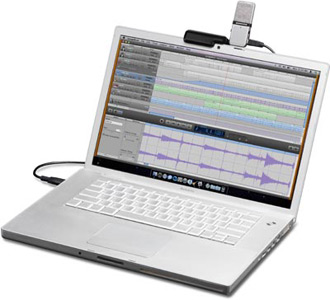
I bought two: one for our daughter, who’s been using it for Skype, and one for myself. I've been using mine with a netbook to record music rehearsals. While it isn’t a U87, it gets the job done well. I'm also looking forward to using it to record a podcast series I've been planning.
Here's a sample recording
Available from Amazon
Manufactured by Samson
Comments
Leave a comment
A cool tool is anything useful that is superior to comparable items. If you think this tool is inferior suggest a better one. You are welcome to insult a tool, but comments containing insults to individual people will be deleted. Corrections of fact are always welcomed, if stated politely. Recommendations of better tools are dearly wanted and may be elevated to the front page.

Favorite (15)


Mark Kasdorf
Would you mind commenting on how this compares to the logitech desktop mic here: http://www.amazon.com/Logitech-Desktop-Microphone-Black-Silver/dp/B00009EHJV/ref=sr_1_1?ie=UTF8&s=electronics&qid=1263308784&sr=8-1
I've been in the market for a mic for business skype use, and am about to pull the trigger on the logitech.
Mark
AF
So if you clamp it to your laptop - you don't end up recording noise from the fan or the hard drive?
Jeff Bragg
Mark,
I think the logitech is probably your best bet. As long as you're not trying to do anything high quality for broadcast, you could save some $ getting that one. If you ever plan to do podcasts or field recording you might want to spring for the Samson.
AF,
I've used it a bunch and had no problems yet, although my netbook is very quiet. You don't have to clamp it on, though. You can use the clamp as a base and set the mic to the side of your computer. Experiment with it to get the most unwanted sound rejection Also use the cardioid setting. That way sound to the rear of the mic are rejected.
Mark and AF: hope this helps!
Best,
Jeff
kalavinka
For those like AF concernced about picking up noise from the fan and hard drive, this was my issue with a different mic and since I was podcasting, I decided to just go with a portable digital recorder that is quite small and doesn't pickup much noise. I wanted to do field interviews without being tied to a laptop so I thought it was a good solution. But even with this handheld I have to be careful with table noise (drinking glasses sound like they're being slammed onto the table). I've seen a podcast setup where someone made it like a radio station mic but attached to a clamped lamp.
brad
For people who are looking for reviews of portable recorders for podcasting or field recording, I haven't seen any better source than Mark Nelson's in-depth reviews for O'Reilly; see the summary table here:
http://digitalmedia.oreilly.com/audio/portable-recorder-comparison/
He's a musician so these are more music-focused reviews, but there's good info in the reviews for podcasters as well. Another good source for reviews is Transom:
http://transom.org/?category_name=tools
elon
Great tip. Thanks for those links, brad!--es
Curtis
Transom is just an amazing resource (and has been for a long time). Great to see it referenced here. Thanks Jeff for the review and thanks brad for the links!
Andrew S
How does the quality of this mic compare to say, the pair that are on the (previously reviewed) Zoom H4 portable recorder?
Jeff Bragg
I also own the Zoom H4 and I think it sounds great. I've use it for recording bands, interviews and the like. Usually I have to transfer the files to a computer to further process them (editing, compression, eq, limiting). As long as I only need a mono file, the Go-Mic is the easier to set up and the audio is already in the application that I use to edit and process. And there is that omnidirectional pattern on it, also.
I hope this helps.
Amy Thomson
I would like to know if this mike is useful only for dictating into while sitting on top of your laptop, or can it be used to record a lecture while sitting in the audience. I currently use a Sony mini disc player, and download it to my Mac. I'd like to find a way to record good quality sound directly onto my laptop.
Jeff Bragg
Amy,
Although I've not use it for this application, I don't see why it wouldn't work well. One thought though: most mini disc recorders use compression during recording. If you're not familiar with this process, it is used to bring up the volume of quieter sections of a recording and bring down the louder sections. You might need to apply a process like this to recordings done with the Go Mic and you'll need extra software to do it, The sample recording above uses this process,
I hope this helps.
brad
Amy, you should be able to use this mic to record lectures: just fit it so it's pointing away from you, toward the lecturer, and probably set it to cardioid mode as opposed to omni so it doesn't pick up your clacking keys if you're taking notes or responding to emails during the lecture.
The Macbook's own tiny built-in microphone actually does a remarkably good job of recording meetings and lectures; I've used it for that myself. The sound quality is not fantastic, but is acceptable if you're just trying to listen to a lecture. I've also used it to record music lessons and it works fine for that purpose as well.
You can record directly to GarageBand, if you have it; if you don't I highly recommend Amadeus Pro, which I've been using for six or seven years now.